Keyboard Shortcut (page 8)
390 posts, newest first. Page 8 of 11. Looking for one key? See the keyboard shortcut reference.
-

Boost Your Editing Speed: How to Use the Control-‘(Apostrophe) Shortcut in Final Cut Pro
Final Cut Pro is a powerful tool for video editors, packed with shortcuts and features designed to streamline the editing process. One such time-saving…
-

How to Remove Analysis Keywords in Final Cut Pro: A Quick Guide for Editors
If you’re working with a large project in Final Cut Pro , chances are you’re using various forms of metadata, including analysis keywords , to help…
-
How to Use the Control-Option-Command-3 Shortcut in Final Cut Pro for Stereoscopic 3D Editing
If you're editing stereoscopic 3D footage in Final Cut Pro , it's essential to have the right tools to visualize and fine-tune the 3D effects. One…
-
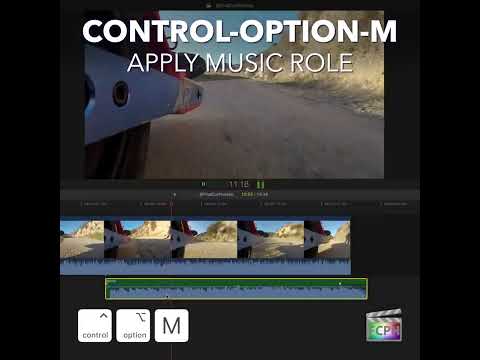
How to Use the Control-Option-M Shortcut to Apply the Music Role in Final Cut Pro
If you're working in Final Cut Pro and frequently handle audio in your projects, you know that managing and organizing audio clips can quickly become a…
-

How to Use the Control-Shift-1 Shortcut for the Organize Workspace in Final Cut Pro
Final Cut Pro includes built-in workspaces, which are window layouts for different kinds of work. Control-Shift-1 switches to the Organize workspace, a…
-

Mastering the E Keyboard Shortcut in Final Cut Pro: Streamline Your Editing Workflow
If you’re an editor using Final Cut Pro , you know how essential it is to have a smooth and efficient workflow. Whether you're working on a feature film…
-

Mastering the Nudge: How the , (Comma) Shortcut Can Transform Your Final Cut Pro Workflow
When you’re editing in Final Cut Pro , every frame matters. Whether you’re syncing audio, fine-tuning transitions, or ensuring seamless action, precision…
-

Boost Your Editing Efficiency in Final Cut Pro with the Option-M Shortcut
When editing in Final Cut Pro , efficiency is key. As editors work through complex timelines filled with clips, transitions, effects, and audio, staying…
-

How to Use the Option-Command-2 Shortcut in Final Cut Pro: Toggle Between Filmstrip and List Views
If you're an editor working in Final Cut Pro , you know that managing your media efficiently can make all the difference in your editing workflow. One…
-

Using the Option-Left Arrow Shortcut in Final Cut Pro to Move Clips Left
In Final Cut Pro, Option-Left Arrow runs Move Left . It moves the selected clip to the left so it swaps places with the previous clip. Instead of dragging…
-
Mastering Audio Adjustments in Final Cut Pro: The Control- - (Hyphen) Shortcut
When it comes to editing audio in Final Cut Pro , precision is key. Whether you're adjusting dialogue, music, or sound effects, getting the right balance…
-

Mastering Final Cut Pro: How to Use the Control-M Keyboard Shortcut to Delete Markers
Final Cut Pro is a powerful video editing tool used by professionals and enthusiasts alike. One of its core features is the ability to place markers on…
-

How to Use the Command-` Shortcut in Final Cut Pro to Maximize Your Editing Workspace
When you're working in Final Cut Pro, managing your workspace efficiently can make a big difference in your editing speed and workflow. One useful…
-

How to Use the Shift-Command-M Shortcut to Match Audio in Final Cut Pro
When two clips were recorded with different microphones, cutting between them can sound jarring. Match Audio , with the shortcut Shift-Command-M , helps…
-

How to Use the V Keyboard Shortcut to Enable/Disable Clips in Final Cut Pro
When working in Final Cut Pro , editors often need to toggle the visibility of clips in their timeline without deleting or permanently altering them. One…
-

Mastering the Control-Shift-Y Shortcut in Final Cut Pro: How to Use Auditions Like a Pro
Final Cut Pro offers a vast array of tools to help editors refine their projects efficiently, but sometimes it’s the smaller, more nuanced features that…
-
How to Use the Shift-Command-H Shortcut in Final Cut Pro: A Guide to the "Show Horizon" Feature
Final Cut Pro is a powerful video editing software with an array of tools designed to help editors create polished, professional-quality content. One of…
-
Mastering the Magnetic Mask in Final Cut Pro: A Guide for Editors
As an editor, you often need to isolate specific parts of a clip to apply color corrections, effects, or other adjustments. But manually creating masks…
-

How to Use the Shift-3 Shortcut to Source Audio-Only Media in Final Cut Pro
Shift-3 runs the Final Cut Pro command Source Media: Audio Only . It turns on audio-only mode, so the next clip you add to the timeline brings in only the…
-

How to Remove Effects Quickly in Final Cut Pro with Option-Command-X
Final Cut Pro is an incredibly powerful tool for video editors, but with its vast range of features, it’s easy to get overwhelmed—especially when it comes…
-

Mastering Keyframe Navigation in Final Cut Pro: Using the Option-' (Apostrophe) Shortcut
Final Cut Pro is a powerful editing tool that gives editors the ability to create stunning animations, transitions, and motion graphics. A crucial part of…
-

Mastering Audio Edits in Final Cut Pro: Using the Zoom to Samples Feature
When editing audio in Final Cut Pro , precision is key. Whether you're cutting dialogue, adjusting sound effects, or syncing audio to video, being able to…
-

How to Use the Shift-Command-8 Keyboard Shortcut for Audio Meters in Final Cut Pro
As an editor, keeping track of audio levels while working on a project is essential for creating a professional and balanced sound mix. One handy feature…
-
How to Effortlessly Record a Voiceover in Final Cut Pro Using the Shift-V Shortcut
Whether you're meticulously editing a stunning video and need to seamlessly add a captivating voiceover or narrate a specific, dramatic section of your…
-

How to Use the 360° Viewer in Final Cut Pro: A Guide for Editors
If you're working with 360° video in Final Cut Pro , you understand the importance of being able to preview your footage from every angle. To simplify…
-
Streamlining Your Final Cut Pro Workflow: How to Use the Control-Command-R Shortcut to Rename Clips
If you're an editor working with Final Cut Pro , you're likely familiar with the importance of staying organized while navigating complex timelines and…
-

How to Use the Control-Shift-R Keyboard Shortcut to Render All in Final Cut Pro
If you’re an editor using Final Cut Pro , you know that maintaining smooth playback is essential to your workflow. Whether you’re working with…
-

Mastering the Shift-B Shortcut in Final Cut Pro: Blade Speed for Seamless Edits
Want part of a clip in slow motion and the rest at normal speed, without cutting the clip apart? That's what Shift-B is for. Its official name is Blade…
-

Mastering Loop Playback in Final Cut Pro: How to Use Command-L for Efficient Editing
If you’re an editor using Final Cut Pro , you’re probably aware of how crucial it is to streamline your workflow, especially when fine-tuning specific…
-

How to Use the Option-Command-3 Shortcut for Event Viewer in Final Cut Pro
The Event Viewer is a second viewer in Final Cut Pro. It shows the clips you're browsing while the main Viewer keeps showing your project…
-

Mastering the ] (Right Bracket) Shortcut in Final Cut Pro: Select the Right Edge of an Edit
Trimming from the keyboard is one of the fastest ways to fine-tune an edit in Final Cut Pro, and it starts with selecting the right edit point. The ]…
-
Mastering Roles in Final Cut Pro: How to Use the Control-Option-Command-S Shortcut to Expand/Collapse Subroles
Final Cut Pro is known for its powerful tools and features, enabling editors to efficiently organize, edit, and refine complex video projects. One of the…
-

Mastering Undo in Final Cut Pro: How to Use Command-Z for Efficient Editing
One of the most essential shortcuts for any editor, whether you're working on a small project or a massive production, is the Command-Z shortcut. This…
-
Mastering the Shift-, (Comma) Shortcut in Final Cut Pro: Nudge Your Clips 10 Frames Left
As a video editor, one of the keys to working efficiently in Final Cut Pro is mastering keyboard shortcuts. They can drastically speed up your editing…
-

Mastering Timeline Views in Final Cut Pro: The Power of the Control-Option-3 Shortcut
How your clips look in the timeline makes a real difference to how fast you can edit. Final Cut Pro offers several clip appearance settings, and…
-

How to Use the Option-Command-B Shortcut for Color Balance in Final Cut Pro
As a video editor, ensuring your footage looks visually consistent can be one of the most time-consuming tasks. Whether you're working with clips shot in…