Keyboard Shortcut (page 11)
390 posts, newest first. Page 11 of 11. Looking for one key? See the keyboard shortcut reference.
-

Mastering Final Cut Pro: The Power of the Control-Command-J Shortcut for Library Properties
If you're an editor working in Final Cut Pro , you’re probably already familiar with the many shortcuts and tools that streamline your workflow. But did…
-

How to Use the "C" Shortcut to Select the Clip Under Your Pointer in Final Cut Pro
Here’s a shortcut that quietly saves you hundreds of clicks: the C key. In Final Cut Pro, C is Select Clip . It selects the clip under your pointer in the…
-

Understanding the "O" Keyboard Shortcut in Final Cut Pro: A Guide for Editors
If you're an editor working in Final Cut Pro , you might have noticed the "O" keyboard shortcut and wondered what it does. This shortcut is used to set…
-

How to Use the Option-F Shortcut to Insert Freeze Frames in Final Cut Pro
If you're an editor working in Final Cut Pro , you know how essential it is to maintain a smooth and efficient workflow. One powerful yet simple tool at…
-

Mastering the Control-Command-5 Shortcut in Final Cut Pro: Quickly Access Transitions for Efficient Editing
If you're a Final Cut Pro editor, you know how important it is to have quick access to the tools you use most often. One such tool is the Transitions…
-

How to Use the Option-Command-R Shortcut in Final Cut Pro: Resetting Retime for Faster Editing
If you're working with Final Cut Pro and need to quickly reset a clip's timing, there’s a simple and powerful keyboard shortcut that can save you time and…
-

How to Use the Option-Command-C Shortcut to Copy Effects in Final Cut Pro
Final Cut Pro is packed with powerful tools that help video editors streamline their workflows. One of the most useful features is the ability to copy and…
-
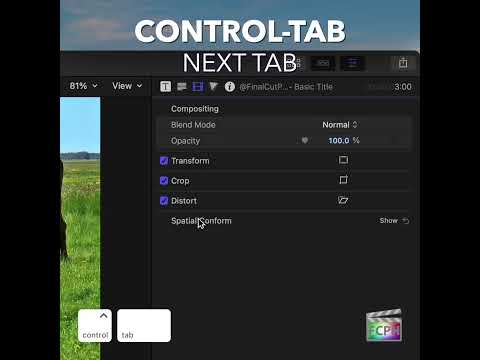
How to Use the Control-Tab Shortcut to Switch Inspector Tabs in Final Cut Pro
The Inspector is where you adjust almost everything about a clip, and its settings are split across several tabs. Control-Tab lets you move through those…
-

How to Use the Shift-Command-R Shortcut in Final Cut Pro to Reveal Media in the Finder
Every clip in Final Cut Pro points to a real media file somewhere on your drives. When you need to find that file, press Shift-Command-R . It runs Reveal…
-

Final Cut Pro | Keyboard Shortcuts | A
Make the Select tool active with this Final Cut Pro shortcut. A free video tutorial from An Awesome Guide with Apple Certified trainer Jared Ewing.
-

Final Cut Pro | Keyboard Shortcuts | Command-6
Use this 2020 #SAVER16 Final Cut Pro X shortcut to go to the default Color Inspector
-

Final Cut Pro | Keyboard Shortcuts | Command-4
Quickly show or hide the inspector, used to view and change attributes of selected items, using this 2020 #ESSENTIAL8 Final Cut Pro X shortcut
-

Final Cut Pro | Keyboard Shortcuts | F
Mark a selection as favorite with this key while editing with Final Cut Pro X
-

Final Cut Pro | Keyboard Shortcuts | M
Keep track of specific spots within a clip while editing with Final Cut Pro X, use this 2020 #FINALCUT4 shortcut to add a marker at the skimmer or…
-

Final Cut Pro | Keyboard Shortcuts | Command-I
Display the Media Import window to add content from a device, camera, or archive with this 2020 #SAVER16 Final Cut Pro X shortcut
-

Final Cut Gym | Episode 1 | Review & Organize Clips Using Shortcuts
Time to workout at the Final Cut Gym. A free video tutorial from An Awesome Guide with Apple Certified trainer Jared Ewing.
-

Final Cut Pro | Keyboard Shortcuts | Control-R
Don’t wait for the entire project to render to playback a specific part. Make a selection and then use this Final Cut Pro X shortcut to begin rendering…
-

Final Cut Pro | Keyboard Shortcuts | Command-Z
Use this Final Cut Pro X shortcut to undo the last command. Hold Command and press the Z key multiple times to undo multiple steps
-

Final Cut Pro | Keyboard Shortcuts | J K L
Control playback with the J, K, and L keys. A free video tutorial from An Awesome Guide with Apple Certified trainer Jared Ewing.
-

Final Cut Pro | Keyboard Shortcuts | S
Press this key while using Final Cut Pro to turn skimming on or off. A free video tutorial from An Awesome Guide with Apple Certified trainer Jared Ewing.
-

Final Cut Pro | Keyboard Shortcuts | / Slash
Use this key to play a selection in Final Cut Pro X. A free video tutorial from An Awesome Guide with Apple Certified trainer Jared Ewing.
-

Final Cut Pro | Keyboard Shortcuts | Right and Left Arrow
Navigating video using Final Cut Pro X is simple, press the left or right key to move the playhead to the previous or next frame
-

Final Cut Pro | Keyboard Shortcuts | Shift-Z
Stop using the sliders and Final Cut Pro X zoom tool for this function! Switch to using this shortcut to zoom the contents to fit the size of the…
-

Final Cut Pro | Keyboard Shortcuts | Option-N
Create a New Event | Use this Final Cut Pro shortcut to create a new event
-

Final Cut Pro | Keyboard Shortcuts | Shift-F
Reveal in Browser | Use this Final Cut Pro X shortcut to reveal the selected clip in the browser
-

Final Cut Pro | Keyboard Shortcuts | V
Use this key to enable or disable playback for a selected clip(s) while editing with Final Cut Pro X
-

Final Cut Pro | Keyboard Shortcuts | E
Use this Final Cut Pro X shortcut to append a selection to the end of the storyline
-

Final Cut Pro | How to slow down a clip in Final Cut Pro using Shift-B
How to slow down a clip in Final Cut Pro using Shift-B Create a variable speed change with this Final Cut Pro X shortcut. When pressed, the Retime Editor…
-

Final Cut Pro | Keyboard Shortcuts | Option-W
Option-W | Insert Gap | Use this Final Cut Pro X shortcut to quickly insert a gap clip at the playhead or skimmer position
-

Final Cut Pro | Keyboard Shortcuts | Introduction
This is an introduction to a series of quick videos describing some of the most useful Final Cut Pro keyboard shortcuts.