Keyboard Shortcut (page 3)
390 posts, newest first. Page 3 of 11. Looking for one key? See the keyboard shortcut reference.
-

Mastering Clip Skimming in Final Cut Pro: A Quick Guide for Editors
If you’re a video editor using Final Cut Pro , you probably know how essential it is to navigate your timeline quickly and efficiently. Whether you’re…
-

Mastering Final Cut Pro: How the Shift-Z Keyboard Shortcut Can Boost Your Editing Workflow
Final Cut Pro is a powerful video editing tool, but like any professional software, it comes with a wealth of features designed to speed up and streamline…
-
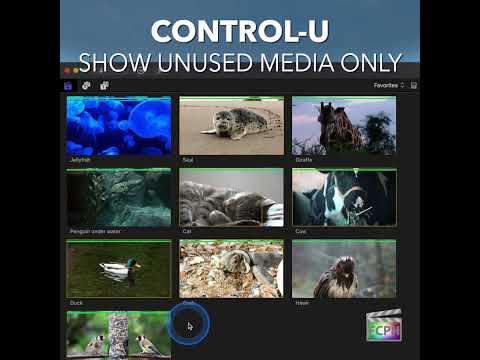
How to Use the "Show Unused Media Only" Feature in Final Cut Pro
When editing in Final Cut Pro (FCP), managing your media can become overwhelming, especially with large projects that contain tons of footage…
-

How to Use the Command-5 Shortcut to Show/Hide the Effects Browser in Final Cut Pro
Final Cut Pro is packed with powerful tools and shortcuts to streamline the editing process, and one of the most useful is the Command-5 keyboard…
-
How to Use the Option-L Shortcut for 1/2 Speed Playback in Final Cut Pro
Final Cut Pro is packed with powerful tools that streamline the editing process, but sometimes the simplest shortcuts can make the biggest impact on your…
-

Mastering the J Shortcut in Final Cut Pro: Play in Reverse for Smarter Editing
Efficiency and precision are key in video editing, and Final Cut Pro offers a variety of keyboard shortcuts to help streamline your workflow. One of the…
-

How to Use the Option-8 Keyboard Shortcut in Final Cut Pro to Switch Multicam Angles
Multicam editing in Final Cut Pro is all about choosing the right camera at the right moment. Sometimes you don't need a new cut at all; you just want a…
-
Boost Your Final Cut Pro Workflow: Mastering the Option-Shift-Tab Shortcut for Title Text
Many titles in Final Cut Pro have more than one text item. A lower third, for example, often has a line for a name and a line for a job title…
-

Mastering the Shift-Command-. (Period) Shortcut in Final Cut Pro: Show More Filmstrip Frames for Precision Editing
When you're looking for one particular moment in a long clip, a single thumbnail doesn't tell you much. Shift-Command-Period runs Show More Filmstrip…
-

How to Use the Shift-Command-G Shortcut to Break Apart Clip Items in Final Cut Pro
In Final Cut Pro, managing complex projects with multiple elements can quickly become overwhelming. That’s where compound clips come in—they allow you to…
-

Mastering Caption Editing in Final Cut Pro: How to Use the Control-Shift-C Shortcut
Captions make your videos more accessible, but proofreading them can mean a lot of clicking. In Final Cut Pro, Control-Shift-C runs Edit Caption : it…
-

Mastering Final Cut Pro: The Power of the "W" Keyboard Shortcut for Insert Edit
If you're an editor working in Final Cut Pro , mastering keyboard shortcuts is essential for streamlining your workflow and saving time. One such shortcut…
-

Mastering Keyboard Shortcuts in Final Cut Pro: How to Use the Home key (fn-Left arrow) to Go to the Beginning
If you're an editor working in Final Cut Pro , time is precious. Whether you're trimming clips, adjusting audio, or crafting the perfect sequence, every…
-

Control-X in Final Cut Pro: Show Clips with No Ratings or Keywords
In Final Cut Pro, Control-X changes the Browser filter to No Ratings or Keywords . The Browser then shows only clips that have no rating (not a Favorite…
-

How to Use the Option-4 Shortcut for Multi-Camera Editing in Final Cut Pro
If you're an editor working with Final Cut Pro and multi-camera footage, you know how crucial it is to be able to switch between different camera angles…
-

Mastering the Timeline Index in Final Cut Pro: The Power of Shift-Command-2
When editing in Final Cut Pro , efficiency is key—especially when working with large, complex timelines. One powerful tool that can help you stay…
-

Maximizing Efficiency in Multi-Camera Editing: How to Use the Shift-Command-Left Arrow Shortcut in Final Cut Pro
If you’re working with multiple camera angles in Final Cut Pro , you know how important it is to stay efficient while editing. One of the best ways to…
-

Mastering the Shift-C Shortcut in Final Cut Pro: Quick Guide to the Crop Tool
Final Cut Pro is packed with powerful features that make video editing a breeze. Among these, the Crop Tool is essential for fine-tuning your clips and…
-

How to Use the Shift-H Keyboard Shortcut to Create a Freeze Frame in Final Cut Pro
If you’re an editor working in Final Cut Pro , one of the most powerful tools you can utilize is the Retime function. Among its various features, the…
-

Mastering the Hand Tool in Final Cut Pro: How the H Shortcut Can Boost Your Editing Efficiency
Final Cut Pro is an incredibly powerful video editing tool, but with so many features, it can sometimes be overwhelming to navigate and find the most…
-

Maximizing Precision in Final Cut Pro: Using the One Frame per Filmstrip Feature
When it comes to video editing, precision is key. Whether you're trimming clips, aligning audio with visuals, or adjusting effects, even the smallest…
-

How to Use the Control-Option-L Shortcut for Volume Adjustment in Final Cut Pro
In Final Cut Pro, Control-Option-L runs Adjust Volume Absolute . It sets the audio volume of every selected clip to a specific dB value that you type in…
-

Boost Your Final Cut Pro Efficiency with the Shift-Command-I Shortcut
Most of the time you mark one range at a time. But when a long clip has several moments you want, it's faster to mark them all at once. Shift-Command-I…
-

Option-Shift-, (Comma) in Final Cut Pro: Nudge an Audio Edit Point Left 10 Subframes
The Option-Shift-, (Comma) shortcut in Final Cut Pro is Nudge Audio Subframe Left Many . It nudges the selected audio edit point to the left by 10…
-
Mastering the Option-I Shortcut in Final Cut Pro: Clearing the Range Start
Option-I runs the Final Cut Pro command Clear Range Start . It clears the start point of your range. It doesn't move the start back to an earlier…
-
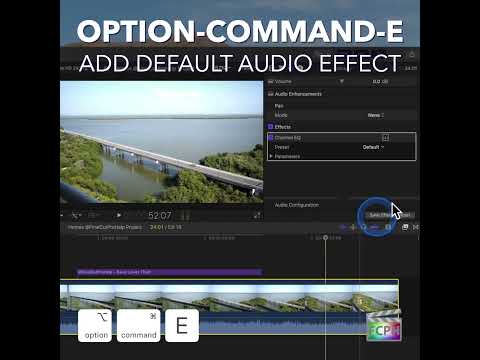
How to Speed Up Your Audio Editing Workflow in Final Cut Pro with the Option-Command-E Shortcut
If you're an editor working in Final Cut Pro , you know that audio is just as important as video when it comes to creating a polished, professional final…
-

Boost Your Editing Efficiency with the F Shortcut in Final Cut Pro
As an editor, staying organized and efficient is key to working with large amounts of footage and tight deadlines. Final Cut Pro offers several tools to…
-

Mastering Frame-by-Frame Editing in Final Cut Pro: The Power of the Right Arrow Shortcut
As a video editor, precision is key — whether you're trimming clips, syncing audio, or fine-tuning effects. One simple yet powerful keyboard shortcut that…
-
How to Use the Control-Option-Command-4 Shortcut in Final Cut Pro to View Stereoscopic 3D Content in Red/Cyan Anaglyph Mode
Final Cut Pro is a powerful tool for video editors, especially for those working with stereoscopic 3D content. If you're editing 3D footage, one of the…
-

The Power of the / Shortcut in Final Cut Pro: How to Play Your Selection with Ease
Final Cut Pro is packed with powerful features designed to speed up your editing process, and one of the most underrated tools is the / (slash) keyboard…
-

Mastering Color Grading in Final Cut Pro: The Power of the Control-Command-S Shortcut for the Saturation Pane
Color grading is a crucial aspect of video editing, and in Final Cut Pro , the ability to fine-tune your clips' colors can elevate your project to a…
-

Mastering the Option-G Shortcut in Final Cut Pro: Creating Compound Clips
If you're an editor working in Final Cut Pro , you've likely encountered the need to simplify a complex timeline or group multiple elements together for…
-

Mastering Multi-Camera Editing in Final Cut Pro: Using the 8 Shortcut to Cut & Switch to Viewer Angle 8
Final Cut Pro offers a powerful and intuitive editing environment for video professionals, especially when working with multi-camera setups. One of the…
-

How to Use the Control-6 Shortcut in Final Cut Pro to Apply Keyword Tags
When it comes to efficient video editing, organization is key. One of the most powerful tools in Final Cut Pro (FCP) for managing large projects is the…
-

How to Use the Control-. (Period) Keyboard Shortcut to Nudge Markers in Final Cut Pro
If you’re an editor working with Final Cut Pro , you know that precision is key. Whether you’re syncing audio, marking key moments, or organizing your…
-

Mastering Audio Transitions in Final Cut Pro with the Option-T Shortcut
When it comes to editing audio in Final Cut Pro , one of the most common tasks editors face is smoothing out transitions between audio clips. Whether…